Chapter 1: Understanding Messaging
Messaging Concepts and Elements, Virtual Hosts, and Message Durability
Producers, Consumers, and Channels #
Producers #
Producers create messages and publish/send them to a broker server (RabbitMQ).
A message is a payload + a label. The payload is the data you want to transmit and the label describes the payload and is how RabbitMQ determines who should get a copy of the message.
Consumers #
Consumers attach to a broker server and subscribes to a queue.
A queue is a named mailbox. Whenever a message arrives in a particular mailbox, RabbitMQ sends it to one of the subscribed/listening consumers.
Channels #
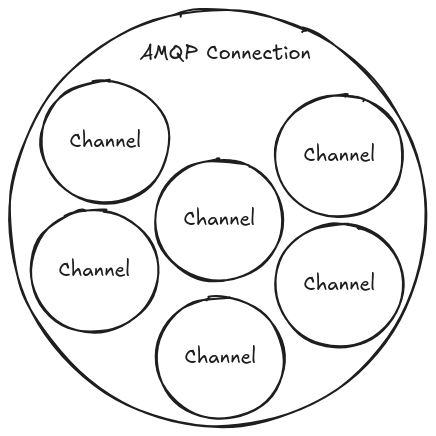
Before consuming or producing messages to/from Rabbit, you first have to connect to a channel.
By connecting you're creating a TCP connection between your app and the RabbitMQ broker.
Once the TCP connection is open (and you're authenticated), your app then creates an AMQP channel. This channel is a virtual connection inside the real TCP connection, and it's over the channel that you issue AMQP commands to.
Every channel has a unique ID assigned to it.
The reason channels are needed is for optimization purposes. Issuing commands over TCP is quite expensive as the connection has to be spinned up and teared down over and over.
Queues #
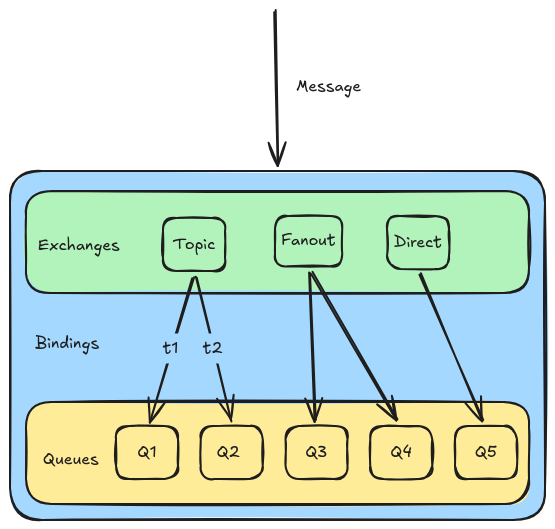
Conceptually, there are three (3) parts to any successful routing of an AMQP message:
- Exchanges are where producers publish their messages.
- Queues are where the messages end up for consumption of consumers.
- Bindings are how the messages get routed from the exchange to particular queues (or other exchanges).
How Consumers receives messages from a Queue #
Consumers receive messages from a particular queue in one of two (2) ways:
-
By subscribing to it via the
basic.consumeAMQP command. This will place the channel being used into a receive mode until unsubscribed from the queue.While subscribed, your consumer will automatically receive another message from the queue (as available) after consuming (or rejecting) the last received message.
basic.consumeshould be used if the consumer is processing many messages out of a queue and/or needs to automatically receive messages from a queue as soon as they arrive. -
Sometimes, you just want a single message from a queue and don't need to be persistently subscribed.
Requesting a single message from the queue is done by using the
basic.getAMQP command. This will cause the consumer to receive the next message in the queue and then not receive further messages until the nextbasic.get.You shouldn' use
basic.getin aloop as an alternative tobasic.consumebecause it's much more intensive on Rabbit.basic.getbasically subscribes to a queue, gets a message, and unsubscribes everytime the command is issued.High-throughput consumers should always use
basic.consume.
Single Queue, Multiple Consumers #
When a Rabbit queue has multiple consumers, messages served by the queue are done in a round-robin fashion.
Consumer Ack[knowledgements] #
When a consumer receives a message from a queue it must acknowledge it.
Either the consumer explicitly sends the basic.ack AMQP command, or it can set the
auto_ack parameter to true when it subscribes to the queue.
When auto_ack is specified, RabbitMQ will automatically consider the message acknowledged
by the consumer as soon as the consumer has received it.
An important thing to remember is that message acknowledgements from the consumer have nothing to do with telling the producer of the message it was received.
Instead, the acknowledgements are a way for the consumer to tell RabbitMQ that the consumer has correctly received the message and RabbitMQ can safely remove it from the queue.
If a consumer disconnects after receiving a message from a queue before acknowledging: RabbitMQ will consider the message to be undelivered and will deliver it to the next subscribed consumer for processing.
If a consumer forgets to acknowledge a message, Rabbit won't send the consumer anymore messages.
How to Create Queues #
Both consumers and producers can create queues using the queue.declare AMQP command.
Consumers can't declare a queue while subscribed to another one on the same channel.
When creating a queue, you usually want to specify its name which will be used by consumers to subscribe to it, and is how you specify the queue when creating a binding.
Other useful properties you can set to Queues #
-
exclusive- When set to true, your queue becomes private and can only be consumed by your app. This is useful when you need to limit a queue to only one consumer. -
auto-delete- The queue is automatically deleted when the last consumer unsubscribes.
Declaring Queues that already exists #
As long as the parameters match the existing queue exactly, Rabbit will do nothing and return successful as though the queue had just been created.
If the parameters don't match, the declaration will fail.
To check if a queue exists, set the passive option of queue.declare to true. With this
on, queue.declare will return successfully if the queue exists, and return an error
without creating the queue if it doesn't.
Exchanges and Bindings #
Whenever a message is delivered to a queue, it is done by sending it through an exchange, then based on certain rules, RabbitMQ will decide to which queue it should be delivered.
These rules are called routing keys.
A queue is said to be bound to an exchange by a routing key.
When a message is sent to a broker, it will have a routing key (even a blank one) which RabbitMQ will try to match to the binding rules of a queue.
If they match, the message will be delivered to the queue.
If a message doesn't match any binding rules, it'll be blackholed.
Routing keys are properties of messages while binding rules are properties of queues.
When a routing key matches a binding rule for a queue, the message will be delivered to that queue.
Exchanges #
An exchange routes a producer's messages to one or more queues or other exchanges.
Every exchange must have a name.
Bindings #
Exchanges, when declared, are not aware of any queues or other exchanges.
An initially declared exchange is an empty named routing table.
A binding is a routing rule that BINDS an exchange to queues or other exhcnages.
A binding has the following properties:
- Source name: name of the source exchange
- Destination name: name of the target queue or other exchange
- Destination type:
queueorexchange
Exchange Types #
An exchange type controls how the messages will be routed that are published to it.
Fan Out #
Fanout exchanges route a copy of every message published to them to every queue or exchange bound to it.
The message's routing key is competely ignored.
Topic #
Topic exchanges use pattern matching of the message's routing key to the routing (binding) key pattern used at binding time.
For the purpose of routing, the keys are separated into segments by ..
Some segments are populated by specific values, while others are populated by
wildcards: * for exactly one segment and # for zero or more (including multiple)
segments.
Direct #
Direct exchanges route to one or more bound queues or exchanges using an exact equivalence of a binding's routing key.
Default Exchange #
The default exchange is a direct exchange that has several special properties:
- It always exists (is pre-declared)
- Its name for AMQP clients is an empty string (
"") - When a queue is declared, RabbitMQ will automatically bind that queue to the default exchange using its (queue) name as the routing key.
Virtual Hosts #
Virtual Hosts allow RabbitMQ to host a collection of connections, queues, bindings, user permissions, policies, etc.
A virtual host is a logical group of entities within RabbitMQ.
Message Durability #
By default, entities such as exchanges and queues within RabbitMQ are stored in-memory.
To make these entities persistent we need to set them as durable.
In order for messages to be persistent, it needs to be flagged with the delivery mode option to .